
16. June 2026 · by Andreas Lehr
SeaweedFS on Hetzner: Self-Hosted S3 Storage — From Disk to Customer Migration
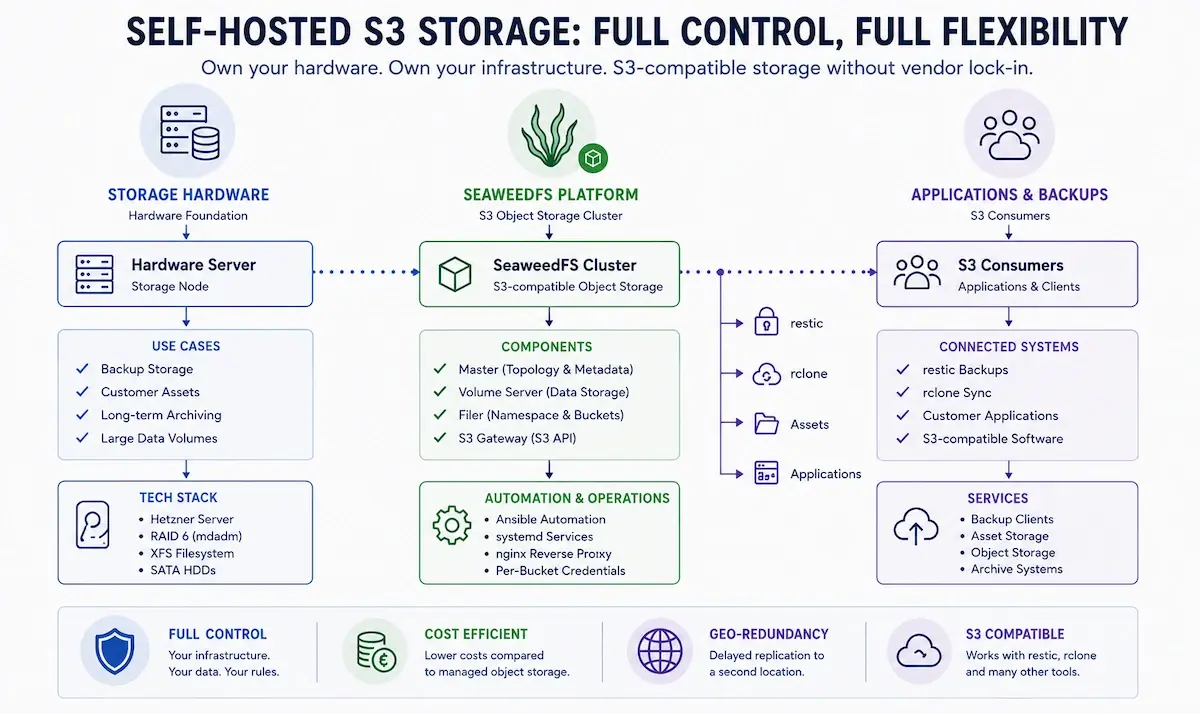
Email was the topic of the last two posts — today it gets more tangible: metal, disks, and an S3-compatible object storage that we run ourselves. Specifically: how to build a robust, affordable S3 backend on ordinary Hetzner hardware that can hold backups, assets and anything else that speaks the S3 API, without locking yourself into a hyperscaler or its object-storage pricing.
We use our own backup infrastructure as a running example. We moved it from MinIO to SeaweedFS earlier this year: more than 100 TB of data, over 40 customer buckets, all driven by restic.
Why we moved off MinIO — and off Hetzner Object Storage
Two things came together. First, MinIO has been moving its license and feature policy in a direction that became increasingly unattractive for a self-hosted setup like ours: features migrated from the community edition into paid tiers, and the uncertainty about what would be cut next is not a great state for a production backup target.
Second, we wanted to run object storage on our own hardware anyway, not buy it as a managed service. The math is straightforward. Hetzner Object Storage starts at €7.72 per TB for the first TB; every additional TB costs €10.35 per month. The first TB of outbound traffic is included, every additional TB is €1.19. What Hetzner does differently from many providers: requests are free, and internal traffic — uploads and anything inside the Hetzner EU infrastructure — is not billed either. Even so, 200 TB of pure storage already lands at roughly €2,100 per month. On top sits a hard cap of 50 million objects per account (details and other limits live in the Hetzner docs) — for backup workloads with lots of small files that ceiling shows up quickly. A dedicated Hetzner Storage Server with the same raw capacity costs a fraction of that, and the backup software (restic, rclone) is open source and free. The second server typically pays for itself against managed object storage within a few months.
On top of that comes a second point that ended up almost as important as the cost: Hetzner Object Storage is currently noticeably unstable. The official status page regularly shows object-storage incidents — depending on the location, sometimes multiple times per week. For a production backup target sitting at the end of a recovery chain, that simply is not an option.

That combination — predictable, owned infrastructure instead of usage-based pricing, plus full control over availability — is why SeaweedFS makes sense for us.
The hardware: Hetzner storage servers
The servers come from the Hetzner catalog, depending on what we need either from the SX storage line or from the auction servers. For pure storage nodes the auction servers are especially attractive: lots of large SATA HDDs, plus one or two NVMe SSDs for the OS, at a fraction of the new-server price.
Something Hetzner offers on top that makes a lot of sense for storage nodes: an optional 10G uplink for dedicated servers. By default every Hetzner server runs on 1 Gbit/s — for initial migrations of 100 TB plus, restore tests, or geo-sync between two storage hosts, 10 Gbit/s is the difference between "finishes overnight" and "finishes over the weekend".
The disks run in software RAID 6 (mdadm). RAID 6 trades two disks for parity and therefore survives two simultaneous disk failures. On large arrays with long rebuild times that is the right choice. A worked example with a well-stocked server:
14 × 22 TB = 308 TB raw
− 2 disks parity (RAID 6)
= 12 × 22 TB = 264 TB usable
≈ 250 TB after filesystem overhead (XFS)
The filesystem is XFS:
mkfs.xfs -f -L seaweed-data /dev/md0Why XFS and not ext4? Because SeaweedFS does not write millions of small files, it writes a few large volume files (up to 30 GB per volume by default). XFS handles exactly this pattern (large, sequentially growing files on large volumes) extremely well.
Understanding SeaweedFS: master, volume, filer
Before installing, a quick look at the architecture — SeaweedFS consists of a few components you should know:
        ┌──────────────────────────────────────┐
        │              nginx (443)              │
        │           Reverse Proxy / TLS         │
        └───────────────────┬──────────────────┘
                            │
        ┌───────────────────▼──────────────────┐
        │           Filer + S3 Gateway          │  Port 8333 (S3)
        │    S3 API, Buckets, Credentials       │  Port 8888 (Filer)
        └───────────────────┬──────────────────┘
                            │
   ┌────────────────────────┼────────────────────────┐
   │                        │                         │
┌──▼──────────┐   ┌─────────▼─────────┐
│   Master    │   │   Volume Server   │
│ Topology /  │   │   Data on RAID 6  │
│   Raft      │   │   (XFS / md0)     │
└─────────────┘   └───────────────────┘
The master manages the topology and volume assignment (over Raft, and later HA-capable with multiple masters).
The volume server writes the actual data to the RAID array.
The filer exposes the S3 gateway on port 8333 — that is the interface restic, rclone and the rest talk to.
The nice part: SeaweedFS is a single Go binary (weed) that takes on the respective role depending on how it is invoked. No dependency hell, no container stack — one binary, a handful of systemd units, done.
Installation and operations with Ansible
There are a few SeaweedFS Ansible roles out in the community, but most of them are stuck on old 2.x versions. SeaweedFS is so simple that we built our own lean role instead. It fits cleanly into our existing Ansible structure and is referenced via an app-type from the base host.
We have released the role on GitHub under MIT license — if you want to run SeaweedFS on your own hardware, you can use it as a starting point or fork it: github.com/we-manage/we-manage.seaweedfs.
The role follows the standard layout:
roles/seaweedfs/
├── defaults/main.yml      # version, ports, paths, bucket definitions
├── tasks/
│   ├── main.yml           # orchestration
│   └── install.yml        # binary download, mount, systemd
├── templates/
│   ├── master.service.j2
│   ├── volume.service.j2
│   ├── filer.service.j2
│   ├── s3.json.j2         # identities / per-bucket credentials
│   └── nginx.conf.j2
└── handlers/main.yml
Installing the binary is trivial and version-pinned through the role, so we always know exactly which version runs on which server:
wget https://github.com/seaweedfs/seaweedfs/releases/download/4.34/linux_amd64.tar.gz
tar xzf linux_amd64.tar.gz
install -m 0755 weed /usr/local/bin/weed
The three services run as separate systemd units. The key piece is the S3 gateway with per-bucket credentials. SeaweedFS manages credentials via an identities JSON — every customer gets their own access/secret key and only sees their own bucket. Simplified, an entry looks like this:
{
  "identities": [
    {
      "name": "customer-example",
      "credentials": [
        { "accessKey": "...", "secretKey": "..." }
      ],
      "actions": [ "Read:customer-example", "Write:customer-example", "List:customer-example" ]
    }
  ]
}
The keys themselves live encrypted in the Ansible group_vars — the template renders them into the final S3 config. Onboarding a new customer is one entry in the variables and one playbook run.
In front of all that sits nginx as a reverse proxy that terminates TLS and exposes the S3 endpoint externally. Two settings matter, otherwise restic will misbehave with large objects:
server {
    listen 443 ssl;
    server_name storage.example.com;

    client_max_body_size 0;   # no upload size limit for large objects
    proxy_buffering off;       # stream instead of buffering

    location / {
        proxy_pass http://127.0.0.1:8333;
        proxy_set_header Host $host;
        proxy_set_header X-Real-IP $remote_addr;
        proxy_read_timeout 600;
        proxy_send_timeout 600;
    }
}
client_max_body_size 0 lifts the upload size limit, proxy_buffering off makes nginx stream large objects instead of buffering them in full. The generous timeouts give restic operations enough headroom.
The migration: phased from MinIO to SeaweedFS
This was the part we had the most respect for — and it turned out to run remarkably smoothly. We went phased on purpose instead of doing a big-bang cutover: small customers onto the new server first, in parallel to a still-running MinIO. That let us verify the SeaweedFS platform under real load without risking the large buckets. We moved bigger customers over step by step. For a while both stacks ran in parallel — the real-world conditions were also the test.
The flow was:
Stand up a new storage server and install SeaweedFS via Ansible — in parallel to MinIO, without touching it.
Create all buckets and credentials. A dedicated playbook iterates over the customer list in
group_varsand creates every bucket and the associated credentials in a single run — 40+ customer buckets in a few minutes.Move the data and then switch the endpoints over. Only once everything was cleanly mirrored and the first backups ran against SeaweedFS did we turn MinIO off.
Per customer that was technically a three-step run:
rclone copy minio:customer seaweed:customer --transfers 32 --checkers 32
rclone check minio:customer seaweed:customer --checkers 32
ansible-playbook base-host.yml -e env=customer_all -t restic
rclone check is the key step here: a byte-level comparison before the endpoint switch. Copying 100 TB without verifying gives you a promise, not a backup. The endpoint switch itself happens via an Ansible re-deploy with tag restic — that updates the restic config on the backup clients and points them at the new server. From the next backup run on they write to SeaweedFS.
restic against SeaweedFS
Customer backups run with restic talking directly to the SeaweedFS S3 API. restic and S3 are a well-rehearsed pair: deduplication, encryption and snapshot management happen client-side, the object store just has to hold blobs. For SeaweedFS that means very little configuration — it is simply an S3 target.
One thing to watch with large restic repositories is the prune and retention runs: they delete old pack files and visibly change the repository. That matters for geo-redundancy because the replica has to follow those deletions. More on that in a moment.
Geo-redundancy: a second site as replica
A backup at a single site is not a complete disaster-recovery story. So we keep a second storage server at a different Hetzner location, geographically separated, so that a datacenter outage cannot wipe out both copies at once. Call them server 1 (primary) and server 2 (replica).
SeaweedFS has its own replication mechanisms — cluster-internal volume replication or filer.sync for cross-datacenter setups. For our case (a pure disaster-recovery mirror, not a synchronous live cluster) we deliberately use rclone sync as a scheduled run. The reasons:
It is a controlled, scheduled run instead of a permanent link between the sites.
It mirrors bucket-wise and traceably, including the deletions caused by restic prune runs.
It is simple to operate: one rclone config, one systemd timer, done.
The decisive trick: the sync runs during the day, deliberately offset from the nightly backup runs. That creates an intentional time gap between original and replica. If a nightly run corrupts data or writes the wrong thing, that state is not immediately mirrored to the second server. There is a window to react before the replica catches up. A synchronous live mirror would have copied the error along straight away.
The rclone config lives at /etc/rclone/rclone.conf and defines both sites as S3 remotes:
[server1]
type = s3
provider = Other
endpoint = https://storage-1.example.com
access_key_id = ...
secret_access_key = ...

[server2]
type = s3
provider = Other
endpoint = https://storage-2.example.com
access_key_id = ...
secret_access_key = ...
The actual sync is a one-liner that runs from a timer:
rclone sync server1: server2: --transfers 4 --checkers 8sync (not copy) turns server 2 into an exact mirror of server 1 — anything deleted on the source disappears on the destination. That keeps the replica consistent with the primary, retention included. We are deliberately conservative on the transfer parameters: four parallel transfers are plenty for a single storage host and avoid overloading the system.
Monitoring the hardware: SMART, RAID and temperatures
Anyone running double-digit disk counts in a single server has to monitor them — not on principle but because with that many HDDs, statistically, one will fail every so often. For exactly this case we use a universal hardware-monitoring tool we have built and refined over the years: a Python script that captures sensor values and surfaces them via Telegraf → VictoriaMetrics → Grafana.
On software RAID we read the disk temperatures directly via smartctl from the individual disks — the RAID members are just regular block devices. The RAID state itself comes from /proc/mdstat / mdadm. The SMART attributes we particularly watch are the ones that announce an imminent disk failure:
for disk in /dev/sd?; do
  echo "=== $disk ==="
  smartctl -a "$disk" | grep -iE "reallocated|pending|uncorrectable"
done
Reallocated Sectors, Pending Sectors and Uncorrectable Errors are the early warning indicators: if they go up, we replace the disk before it gives out completely. On top of that, Icinga2 health checks raise alarms when something actually goes wrong. So we know about a disk problem long before the RAID gets into a critical state.
The same monitoring obviously covers the second site too — both servers hang off the same monitoring stack.
Bottom line
SeaweedFS on your own Hetzner hardware is not rocket science. At the core it is a Go binary, a RAID 6 array with XFS, and a clean Ansible role that makes operations reproducible. In return you get a full S3-compatible object store with full cost control, no vendor lock-in and no license surprises — on European infrastructure.
The work is less in the installation and more in the surroundings: well-thought-out per-bucket credentials, a migration without client downtime, a geographically separated replica, and — not to be underestimated — solid hardware monitoring. Set up cleanly once, this is a storage base that carries you for years and grows with you.
If you want to self-host but do not want to deal with running storage servers, migrations and monitoring: that is exactly what we are here for. We run both cloud and dedicated hardware servers for our customers — including setup, migration and ongoing monitoring. Get in touch.